5.1 KiB
5.1 KiB
Point of Sale (POS) System Design Document
1. System Overview
The POS System is a cross-platform application built using Python, FastAPI for the backend API, and Kivy for the frontend UI. It aims to provide a modern, efficient, and user-friendly interface for managing inventory, processing orders, and analyzing sales data.
2. Backend Features (FastAPI)
2.1 Inventory Management
- CRUD operations for inventory items
- Real-time stock updates
- Low stock alerts
- Bulk import/export of inventory data
- Barcode/SKU support
- Categories and tags for items
2.2 Order Management
- Create, read, update, and delete orders
- Process different payment methods (cash, credit card, mobile payments)
- Apply discounts and promotional offers
- Handle returns and refunds
- Generate and print receipts
- Email receipts to customers
2.3 User Management
- User authentication and authorization
- Role-based access control (admin, cashier, manager)
- User activity logging
2.4 Reporting and Analytics
- Sales reports (daily, weekly, monthly, yearly)
- Inventory turnover reports
- Best-selling items
- Revenue and profit calculations
- Customer purchase history
2.5 Integration
- Third-party payment gateway integration
- Accounting software integration (e.g., QuickBooks)
- E-commerce platform synchronization
3. Frontend Features (Kivy)
3.1 Main Dashboard
- Overview of key metrics (daily sales, top-selling items, low stock alerts)
- Quick access to main functions (new sale, inventory, reports)
3.2 Point of Sale Interface
- Grid/list view of inventory items with search and filter options
- Shopping cart functionality
- Quick quantity adjustment
- Barcode scanner integration
- Payment processing interface
3.3 Inventory Management Interface
- List and grid views of inventory items
- Detailed item view with edit capabilities
- Add new item interface
- Bulk actions (update prices, quantities)
3.4 Reporting Interface
- Interactive charts and graphs for sales data
- Customizable date ranges for reports
- Export options (PDF, CSV)
3.5 Settings and Configuration
- User profile management
- System settings (tax rates, receipt customization)
- Backup and restore functionality
4. UI/UX Design
4.1 Layout
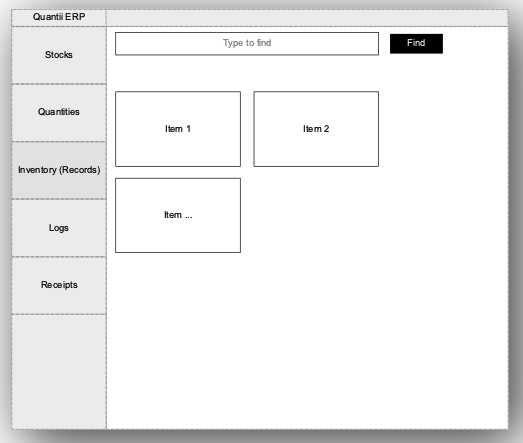
- Responsive design for various screen sizes
- Left navigation bar (collapsible)
- Main content area (grid/list views)
- Right panel for details/preview (slides in/out)
4.2 Color Scheme
- Primary color: #3498db (blue)
- Secondary color: #2ecc71 (green)
- Accent color: #e74c3c (red)
- Neutral colors: Various shades of grey
4.3 Animations
- Smooth transitions between pages (slide animations)
- Fade in/out for modals and popups
- Subtle hover effects on interactive elements
- Loading spinners for async operations
5. Technical Implementation
5.1 Backend (FastAPI)
- RESTful API design
- Asynchronous request handling
- JWT for authentication
- MongoDB for data storage
- Background tasks for report generation and alerts
5.2 Frontend (Kivy)
- KivyMD for material design components
- Custom widgets for specialized functionality
- Asynchronous API calls using
httpx - Local storage for offline capabilities
- Reactive programming patterns for real-time updates
5.3 Data Synchronization
- Websockets for real-time updates between devices
- Conflict resolution for offline-online synchronization
- Periodic data backup to cloud storage
6. Cross-Platform Considerations
6.1 Desktop (Windows, macOS, Linux)
- Native installers for each platform
- System tray integration
- Keyboard shortcuts for quick actions
6.2 Mobile (Android, iOS)
- Touch-optimized interface
- Mobile-specific features (camera for barcode scanning)
- Responsive layout adjustments
6.3 Tablet
- Optimized layout for larger touch screens
- Split-view functionality for multitasking
7. Deployment and Packaging
7.1 Backend Deployment
- Containerization using Docker
- Load balancing for scalability
- CI/CD pipeline for automated testing and deployment
7.2 Frontend Packaging
- PyInstaller for desktop applications
- Buildozer for Android APK generation
- Kivy iOS packager for iOS IPA creation
7.3 App Store Considerations
- Compliance with app store guidelines
- In-app purchase integration for subscription models
- App signing and notarization processes
8. Security Considerations
- End-to-end encryption for data transmission
- Secure storage of sensitive data (encryption at rest)
- Regular security audits and penetration testing
- Compliance with data protection regulations (GDPR, CCPA)
9. Performance Optimization
- Database indexing for quick queries
- Caching mechanisms for frequently accessed data
- Lazy loading for large datasets
- Image optimization for product photos
10. Future Enhancements
- AI-powered inventory forecasting
- Customer loyalty program
- Integration with IoT devices for smart inventory management
- Augmented reality features for product visualization
This design document provides a comprehensive overview of the POS System's features and technical considerations. It serves as a roadmap for development and can be updated as the project evolves.